Skip to content

Assessments

Assessment Reports

View and analyze assessment performance data across users and organizations.

You can view comprehensive assessment performance data to track progress, identify learning gaps, and measure training effectiveness across your organization.

Assessment reports provide detailed analytics on:

  • Individual and group performance
  • Question-level analysis
  • Exam completion rates
  • Progress tracking over time
  • Proctor certification status

Reports help administrators identify trends, measure program effectiveness, and support data-driven training decisions.

Assessment reports are available in several locations:

  1. Navigate to eLearn > Reports > Assessment Progress
  2. Select specific content types or organizations
  3. Filter by completion status or date range
  4. Export results as needed

The Assessment Progress report shows guided content enrollments that are started, in progress, or failed — including assessments with attempts that have not yet been completed.

  1. Click the name of a specific assessment in the Assessment Progress report to open its detail view
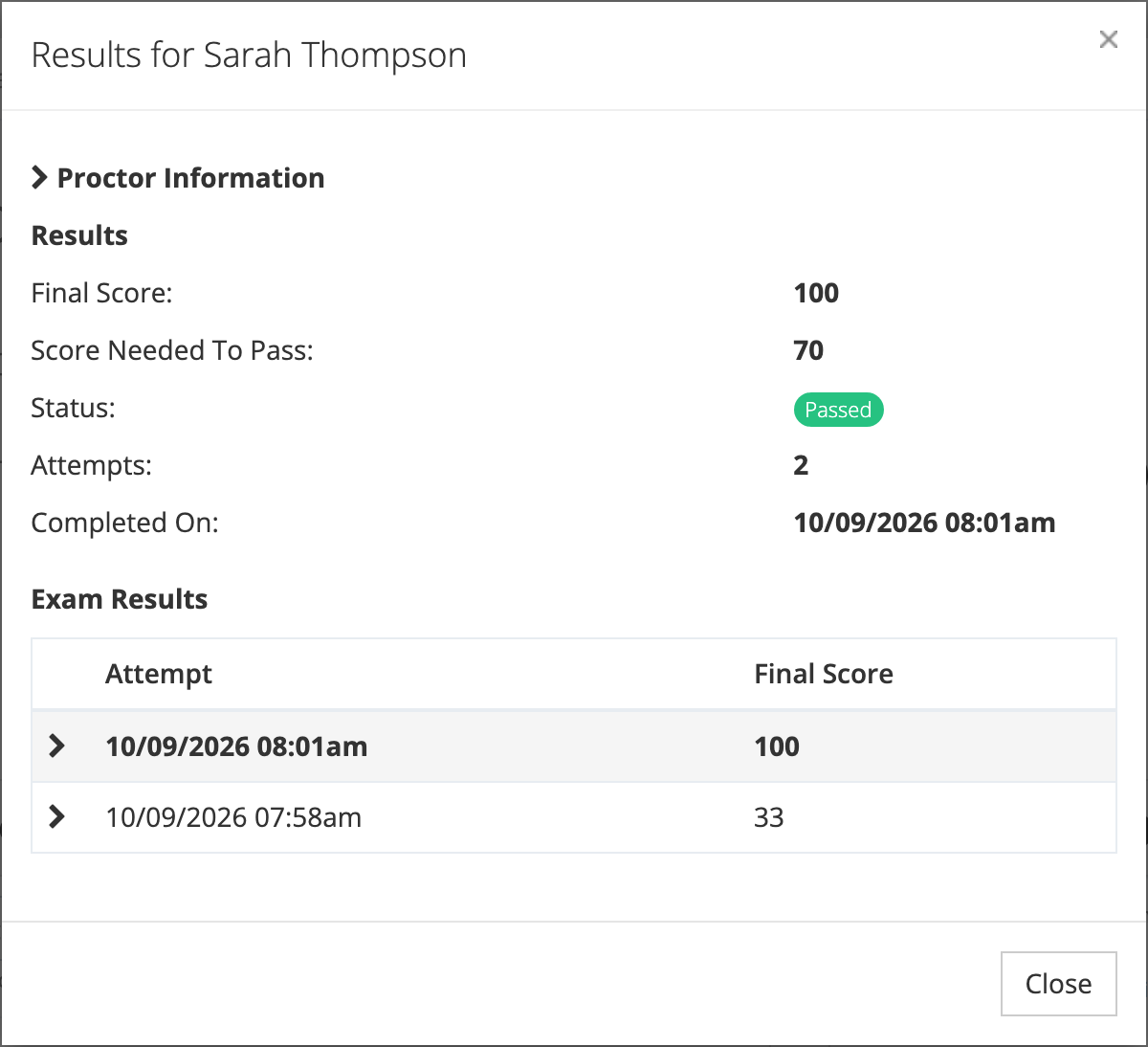
  2. Review exam result data for that enrollment
  3. Analyze attempt history and scoring details
  1. Access eLearn > Reports > Proctor Certifications
  2. Review certification status by organization
  3. Track certification expiration dates
  4. Export certification records as needed

Note: Available reports depend on your user role. Reporters can view data for their assigned organizations, while system administrators see all organizational data.

Track assessment completion across your organization. This report surfaces enrollments in one of three states:

  • In progress — the learner has started the assessment (percentage complete > 0)
  • Not started with attempts — the learner has not officially started but has made at least one attempt
  • Failed — the learner did not pass the assessment

Proctors see a scoped version of this report that shows only enrollments from their own proctored sessions.

Detailed assessment performance data for a specific enrollment:

Score Analysis

  • Final scores for each attempt
  • Passing score thresholds
  • Pass/fail status tracking
  • Score trends over time

Attempt History

  • Number of attempts per user
  • Best and most recent scores
  • Date of completion or failure
  • Time spent on assessments

Drill down to individual question performance:

Question Performance

  • Percentage of correct responses
  • Common incorrect answers
  • Average time spent per question
  • Difficulty analysis across users

Content Effectiveness

  • Identify challenging topics
  • Find questions needing revision
  • Track improvement after content updates
  • Compare performance across groups

Narrow your report data using multiple filter options:

  • Select specific schools or departments
  • Include or exclude sub-organizations
  • Compare performance across locations
  • Filter by guided content types (courses, assessments, etc.)
  • Select specific learning paths or libraries
  • Focus on required vs recommended content
  • Filter by job title or role
  • Select individual users or groups
  • Include archived user records
  • Set completion date windows
  • Filter by assignment dates
  • Track progress over specific periods
  • Completed vs in-progress content
  • Passed vs failed assessments
  • Required vs optional assignments

Export report data for further analysis or record-keeping:

  1. Apply desired filters to your report
  2. Click Export > CSV
  3. Receive email notification when ready
  4. Download file with detailed data

CSV exports include all visible columns plus additional metadata for comprehensive analysis.

  1. Filter data as needed
  2. Select Export > PDF
  3. Choose formatting options
  4. Receive formatted report via email

PDF reports provide professionally formatted summaries suitable for presentations or official records.

For organizations using proctored assessments:

  • View current proctor certifications
  • Track certification expiration dates
  • Identify proctors needing recertification
  • Monitor certification compliance
  • See proctor-trainee relationships
  • Track who certified each proctor
  • Verify certification chains
  • Maintain audit trails
  • Review proctored session history
  • Track which proctors administered sessions
  • Monitor session outcomes and results
  • Verify proper proctoring procedures

Identify Learning Gaps

  • Find topics with low success rates
  • Target struggling learners for support
  • Adjust training content based on performance

Track Compliance

  • Monitor required training completion
  • Ensure certification requirements are met
  • Generate compliance reports for stakeholders

Measure Program Effectiveness

  • Compare performance before and after training
  • Analyze score improvements over time
  • Evaluate content quality and relevance

Support Decision Making

  • Use data to justify training investments
  • Identify high-performing content for expansion
  • Make evidence-based curriculum decisions

Tip: Regular review of assessment reports helps maintain training quality and ensures learning objectives are being met across your organization.